Recipients per project: offers, invoices and dunning notices to the right contacts
 Robert Reiz | September 03, 2026 | 11:14 UTC
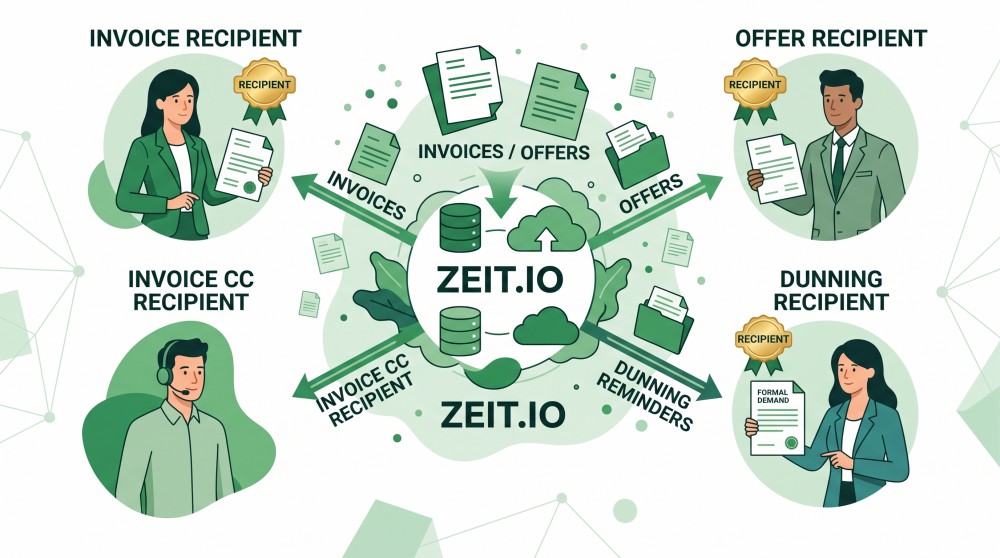
 With small customers it is simple: there is one contact person, and she gets everything. With larger customers reality looks different. The offer goes to the department that ordered the work, the invoice to accounting, the payment reminder to the dunning team – and the assistant should be copied in as well. Until now ZEIT.IO could store exactly one customer contact per project. Anyone who needed the other addresses typed them in by hand on every single send.
That is over. From now on you configure these recipients once on the project, and ZEIT.IO uses them everywhere they are needed.
What you can set on the project
In the project, the Customer section now holds four new fields. They appear as soon as you have picked a customer:
| Field | What it controls |
|---|---|
| Offer recipient | Who receives offers for this project |
| Invoice recipient | Who receives the invoices |
| Invoice CC recipients | Who is copied in on the invoices |
| Recipient of payment reminders and dunning notices | Who receives payment reminders and dunning notices |
The three recipient fields are dropdowns listing the contacts of the selected customer – contact persons and departments are offered side by side. The CC field is a free-text field for email addresses, several separated by commas, exactly as on the invoice send form.
The customer selection itself has become simpler along the way: the dropdown now contains customers only. The nested list that used to mix customers and their contacts into a single field is gone. You pick the customer first – the recipient fields then appear, matching that customer.
How ZEIT.IO preselects
On the customer you can mark what each contact is responsible for – the Invoice recipient, CC, Offer recipient and Payment reminder recipient checkboxes on a contact person or a department. Those markings now do two things:
- They filter the choices. If at least one contact of the customer is marked as invoice recipient, the invoice recipient field offers exactly those contacts. If none is marked, every contact of the customer is available.
- They preselect. If you have not chosen anything for a project yet, the marked contact is already selected. So there is nothing to do when the customer's default is the right one.
If you pick a different customer on the project, the fields reload and the new customer's preselection applies. A choice you have already made is kept – ZEIT.IO does not overwrite it.
Each recipient field also offers the customer address itself, meaning the email address stored on the customer. That is the right choice when no individual contacts are maintained for that customer.
Where the settings take effect
These recipients are not just documentation, they are used:
- Auto-invoices. When ZEIT.IO creates an auto-invoice configuration for a project, the recipient and CC addresses are taken from the project. If nothing is configured on the project, the customer's defaults still apply – existing configurations are therefore unchanged.
- New offer. When you click Create new offer in a project, the project's offer recipient is already selected in the offer form.
- Sending an invoice. On the Send email page the recipient and CC fields are prefilled accordingly.
- Payment reminders and dunning notices. Here the project's dunning contact applies – even when the invoice itself went to a different address earlier. That is exactly the point: the invoice goes to accounting, the reminder to the dunning team.
Sending itself does not change. Every field remains editable before you hit send; ZEIT.IO simply fills them in more sensibly.
New in the invoice module: recipients on the invoice itself
We have reworked the invoice module for organisations as well.
When creating and editing an invoice you now pick the customer from a plain customer dropdown too. Directly below it, two dropdowns appear listing that customer's contacts:
- Invoice recipient
- Payment reminder & dunning recipient
Both are preselected from the contacts marked on the customer, and both can be overridden per invoice. If the customer has no contacts at all, the two fields do not appear – the customer address simply applies.
When an invoice is created from a project, it inherits that project's recipients. You can still set something different on the individual invoice without touching the project setting.
The invoice recipient does not only steer the email: it also determines the contact shown in the address block of the invoice PDF. Previously those two came from two different fields, which regularly caused confusion. Now there is exactly one setting for it.
Why the dunning contact already matters
The payment reminder & dunning recipient on the invoice is more than a convenience for sending by hand. It is the groundwork for a feature we have planned for this year: automated dunning.
The idea: ZEIT.IO detects overdue invoices and sends payment reminders and dunning stages automatically, on a schedule you define. For that to work, it has to be clear at the moment of sending who the notice should go to – without anyone looking it up. That is precisely the information an invoice now records, at the time it is created.
In concrete terms: invoices you create from today on are prepared for automated dunning. So it pays to curate the dunning contact now – on the customer via the marking, on the project as a default, or on the individual invoice when it needs to differ.
Via the REST API
The new fields are available through the API as well, both when creating and when updating a project:
PATCH /api/v1/org/projects/:id
apiKey: your-api-key
Content-Type: application/json

{
  "customer_id": "6716...",
  "offer_recipient_id": "6717...",
  "invoice_recipient_id": "6718...",
  "dunning_recipient_id": "6719...",
  "invoice_recipient_cc": ["accounting@customer.com", "assistant@customer.com"]
}
The three recipient fields expect the ID of a customer contact – a contact person or a department. You get the matching IDs from
GET /api/v1/org/customers/:id/contact_persons
GET /api/v1/org/customers/:id/departments
If an ID does not belong to the project's customer, the API responds with 400. An empty value means: use the customer address. invoice_recipient_cc accepts either a list of addresses or a comma-separated string.
If you have been using customer_contact_id, customer_contact_person_id or customer_department_id: those parameters keep working and now point at invoice_recipient_id. They are marked deprecated in the API documentation – existing integrations do not need immediate changes, but should move to the new names in the medium term.
What you should do now
None of this is mandatory – without any configuration ZEIT.IO behaves as before and uses the contacts marked on the customer. Two things are worth doing though:
- Mark the contacts on your customers. Who receives invoices, who receives dunning notices, who is copied in? Those markings are the basis for every preselection and save you the most work.
- Follow up on projects with differing recipients. Wherever offer, invoice and dunning notice go to different places, the setting on the project is quickly made – and then applies to every future offer, invoice and dunning notice for that project.
Questions?
If you have questions about the new recipient fields, or you are unsure how best to structure your customers' contacts, drop us a line at support@zeit.io.