One number instead of three fields: the CVR number for Danish freelancers
 Robert Reiz | 18. August 2026 | 12:25 UTC
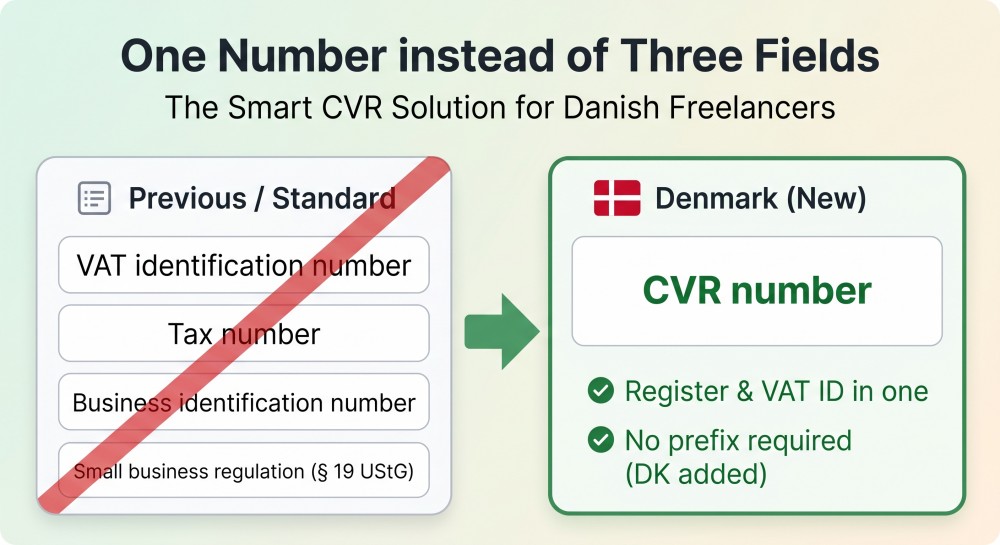
 You are based in Copenhagen, you work for a German client, and you are setting up your profile in ZEIT.IO. The Legal form & taxes page asks you for three things: a VAT identification number, a tax number, and a business identification number. Below that sits a checkbox for the small business scheme under § 19 of the German VAT Act.
You have none of those. You have a CVR number.
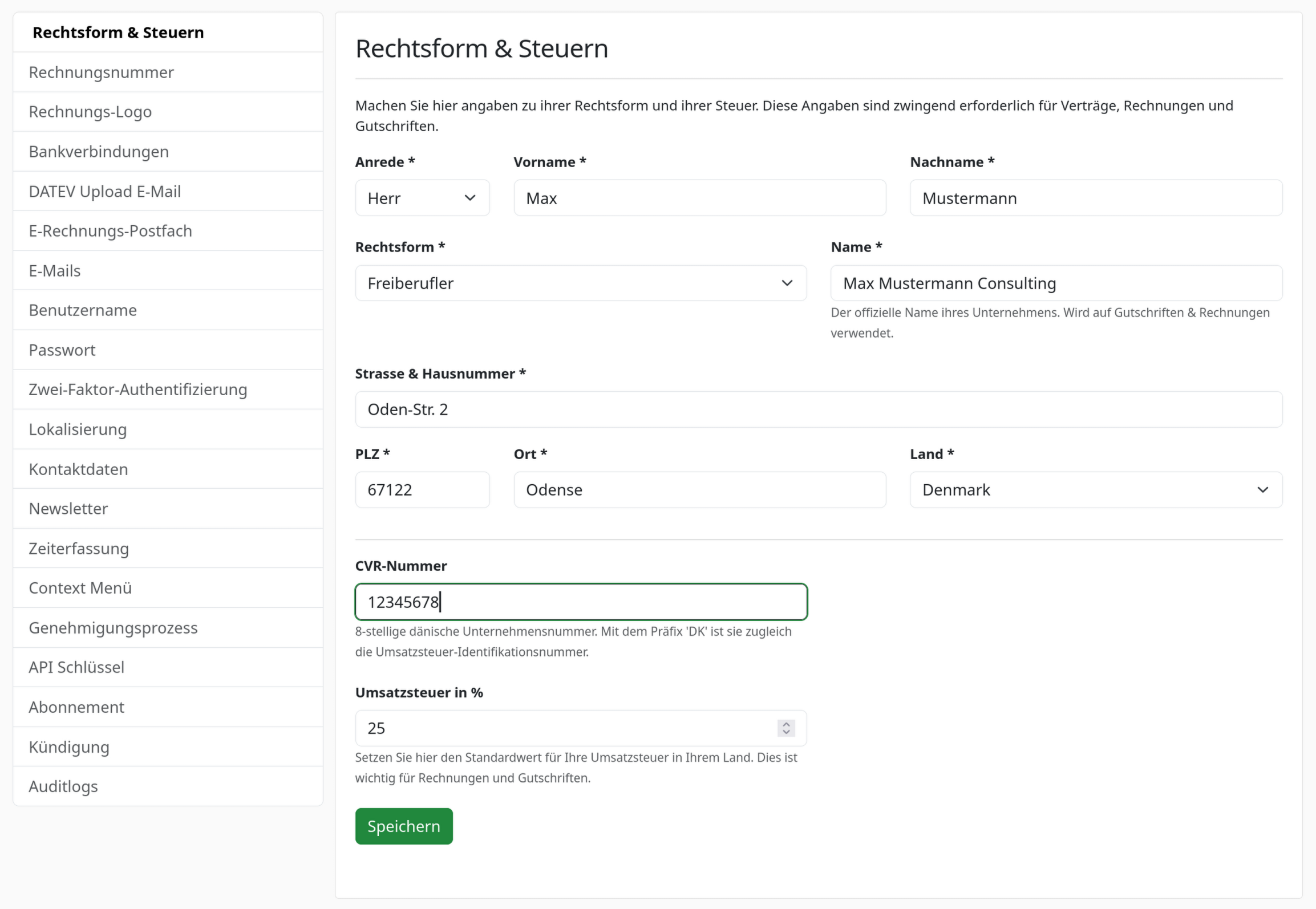
From now on, that is the only detail ZEIT.IO asks you for. Select Denmark as your country and the German tax fields and the small business checkbox disappear. A single field takes their place: CVR number.
And here is how the form looks like:
What the CVR number actually is
The CVR number (Centrale Virksomhedsregister) is the eight-digit registration number of every Danish business. It does two jobs at once, and that is exactly why one field is enough where Germany needs three:
- As a registration number it identifies your business — comparable to a German commercial register number.
- With the
DKprefix it is at the same time your VAT identification number.
So 12345678 becomes DK12345678. ZEIT.IO adds the prefix for you and stores both forms: the plain number as your CVR number, the prefixed one as your VAT ID. You never enter anything twice and you never assemble anything by hand.
The input is forgiving
Danish numbers are written in all sorts of ways in practice. Every one of these produces the same result:
| What you type | What gets stored |
|---|---|
12345678 | CVR 12345678, VAT ID DK12345678 |
DK12345678 | CVR 12345678, VAT ID DK12345678 |
DK 12 34 56 78 | CVR 12345678, VAT ID DK12345678 |
DK-12-34-56-78 | CVR 12345678, VAT ID DK12345678 |
Spaces, dots, hyphens and a leading DK are stripped, and lower case is corrected. What has to remain is exactly eight digits — anything else is rejected with a message rather than quietly stored in the wrong shape.
It works without VAT registration too
This point matters to us, because a lot of systems get it wrong.
Not every Danish business is registered for VAT. If you stay below the Danish registration threshold you have a CVR number, but you are not listed as VAT-liable in the European VAT register (VIES).
ZEIT.IO checks VAT numbers against VIES. For the CVR number, though, that check is a hint and not a barrier: if VIES does not find your number you get a message, and the number is saved anyway. Otherwise you would be unable to change your own address simply because you trade below the registration threshold.
And if the VIES service happens to be unreachable, nothing happens at all. An outage on someone else's side must not stop you from maintaining your own profile.
What about the small business scheme?
It disappears from the form for Denmark — it is a provision of German VAT law and simply does not apply to a Danish business. A checkbox that would have no effect is a checkbox that raises questions, so we do not show it there.
Switch your country back to Germany, Austria or Switzerland later and the option reappears immediately. The form adjusts the moment you make the selection, with no page reload.
What ends up on the invoice
Because ZEIT.IO also stores the CVR number as your VAT identification number, it appears automatically wherever it belongs: on your invoices, and on the self-billed credit notes your clients issue on your behalf.
In the machine-readable e-invoice — the EN 16931 XML embedded in ZUGFeRD and Factur-X — it lands in the correct places: the plain CVR number as the seller identifier under the internationally agreed scheme for the Danish business register, and the prefixed DK12345678 as the VAT identification number. That is precisely the distinction Danish receiving systems expect via NemHandel and Peppol.
For you it means this: you enter one number, and the invoice can be matched automatically.
If you have been with us for a while
Until now, Danish users had no choice but to type the number by hand into the VAT identification field — usually as DK12345678.
Those entries are not lost. ZEIT.IO recognises them and pre-fills the eight digits into the new CVR field the next time you open the page. Save once and everything is stored cleanly separated. Invoices and credit notes you have already issued remain valid and unchanged — the switch applies going forward, not retroactively.
At a glance
| Before | After |
|---|---|
| Three German tax fields, even for Danish users | One field: CVR number |
| Small business checkbox with no use case | Hidden for Denmark |
DK prefix added by hand | Added automatically |
| Strict input format | Spaces, dots, hyphens and prefix accepted |
| VIES check as a barrier | VIES check as a hint |
| Number stored only as a VAT ID | Registration number and VAT number stored separately |
You will find the setting under Settings → Legal form & taxes. Set the country to Denmark, enter your CVR number, save. That is all there is to it.
Questions?
If you have questions about the CVR number, about e-invoicing under Danish requirements, or about setting this up in ZEIT.IO, write to us at support@zeit.io — we are happy to help.