Making Skonto visible: credit notes and bank transactions in ZEIT.IO
 Robert Reiz | September 11, 2026 | 07:45 UTC
 An early payment discount — Skonto — is quickly agreed in a contract and just as quickly forgotten in accounting. Until now the credit note list only showed the gross amount. Whether a credit note had been settled inside the discount window at a reduced amount, or simply paid in full, was not visible there. Anyone who wanted to know had to open each credit note individually.
The credit note overview now shows the Skonto amount right in the amount column — and the CSV export carries it as a column of its own.
In the credit note overview
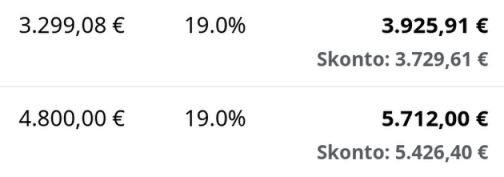
The gross amount column now answers three cases differently:
| Situation | What the column shows |
|---|---|
| Open, discount window still running | Gross amount, with the Skonto amount below it in small print |
| Paid with Skonto | Gross amount struck through, with the Skonto amount actually paid below it |
| Everything else | Gross amount as before, with a payment bar for partial payments |
The struck-through figure is the real piece of information here: at a glance it says that less money changed hands than originally stated — and how much less.

ZEIT.IO only counts a credit note as "paid with Skonto" when a discount was genuinely agreed and the amount paid matches the reduced figure exactly. A credit note transferred in full inside the discount window stays an ordinary paid credit note.
Two new columns in the CSV export
The credit note export has gained two extra columns, directly after the gross amount:
- With Skonto — the reduced amount when a discount option is selected
- Sum paid — what actually came in or went out
That turns "How much Skonto did we take last quarter?" into a single subtraction in your spreadsheet, instead of a document-by-document review.
The audit log now names the bank transaction
When a payment is linked to a credit note or an invoice, its payment status changes and ZEIT.IO records that in the audit log. Previously the entry only said that a bank transaction was involved:
changed the status from
finaltopaidafter linking a bank transaction
Now it says which one:
changed the status from
finaltopaidafter linking the bank transactiona1b2c3d4-…
That identifier is the unique ID your bank keeps the transaction under. From the audit log of a document there is now a direct path back to the specific line on the bank statement — months later, and also when the link has since been removed again.
And to go with it: filter by UUID
The transaction list under Accounting → Bank accounts has an additional search field for exactly that identifier. Paste the UUID from an audit log entry and the list shows the matching transaction. The field also matches fragments, so part of the identifier is enough.
Together this gives you one continuous path: from the payment status on the document, through the audit log, to the bank transaction — and from there, via the paper clip, back to every document attached to that transaction.
Where to find it
Your organisation's credit notes live in the menu under Accounting → Credit notes (Outgoing), with the CSV export above the list as usual. There is nothing to set up — the new figures appear automatically as soon as a credit note carries a Skonto option.
Questions about Skonto, payment matching or exports? Write to us at support@zeit.io — we are happy to help.