When an invoice arrives after all: incoming invoices can now be assigned to expense submissions
 Robert Reiz | 22. September 2026 | 04:53 UTC
 External workers bill an organisation for two kinds of services: their working time and their expenses. In ZEIT.IO, time is recorded and approved through timesheets, and expenses such as travel, hotels, train tickets and materials go through expense submissions.
ZEIT.IO has a clear rule for how either becomes a payment. The default is the credit note procedure (self-billing). Incoming invoices are there for the exceptions where it can't be used. This release closes a controlling gap for exactly those exceptions.
The default: the credit note procedure
In the credit note procedure, the supplier doesn't write an invoice. The organisation issues a credit note for the approved service instead. In ZEIT.IO it works like this:
- The supplier submits a timesheet or an expense submission.
- The organisation reviews and approves it.
- ZEIT.IO creates the credit note from the approved data.
The supplier doesn't write an invoice or type anything. The organisation doesn't capture an invoice, compare amounts or resolve discrepancies. The credit note matches the approved service because it is built from exactly that data. Document number, tax, project and supplier are filled in correctly without anyone touching them.
That makes approval the only manual step, and it is the step where a professional review actually adds value. Everything after it is routine, and ZEIT.IO handles the routine.
The credit note procedure is the default in ZEIT.IO, and we recommend it for every supplier who can use it.
The exception: the incoming invoice
Not every supplier can or wants to take part in the credit note procedure:
- Some suppliers prefer to write their own invoices, for example because their own bookkeeping is set up that way.
- In some countries the credit note procedure is not legally permitted or not customary. There, the invoice has to come from the service provider.
For these cases, ZEIT.IO processes incoming invoices in PDF or XML format. They reach the system in three ways: by drag & drop, by email or through the API. This works, but it is only the second-best solution.
Why incoming invoices cost more
With the credit note procedure, the effort ends with the approval. With an incoming invoice, that is where it begins:
| Step | Credit note procedure | Incoming invoice |
|---|---|---|
| Approve the service | ✔ | ✔ |
| Receive and capture the invoice | – | manual |
| Check amount, tax, delivery date, supplier | – | manual |
| Match the invoice against the approved service | – | manual |
| Resolve discrepancies with the supplier | – | manual |
| Release the invoice | – | manual |
| Rule out double billing | automatic | manual |
Each of these steps takes time in accounting, and each is a chance for errors. For a single invoice that is a few minutes. For fifty external consultants with monthly time and expense billing, it becomes a noticeable item in the month-end close. Processing an incoming invoice costs considerably more than processing a credit note.
So our goal is not to make the incoming invoice as convenient as the credit note. The goal is that it is no less controlled.
The controlling gap
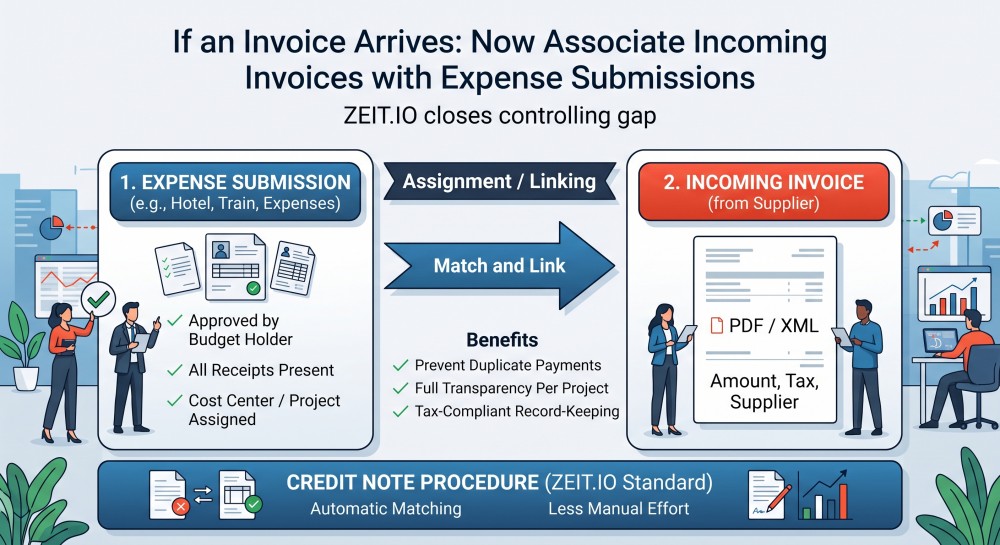
For working time this was already solved: in ZEIT.IO, an incoming invoice can be assigned to the timesheet it is based on. For expenses, that link was missing. A freelancer's travel expense invoice did end up in ZEIT.IO, but without any connection to the expense submission the organisation had already reviewed and approved.
That left controlling unable to answer a simple question:
Have we already paid for these expenses, and if so, with which invoice or credit note?
Answering it meant matching amounts, periods and names by hand. In the worst case, expenses were reimbursed twice. In the second-worst case, an approved submission stayed open for months without anyone noticing.
This release changes that. An incoming invoice can now be assigned either to a timesheet or to an expense submission.
How it works
Timesheet or expense submission
The assignment section of the incoming invoice form now has a toggle with two options:
Proof of performance | Expense Set
The two assignments are mutually exclusive. An invoice belongs either to a timesheet or to an expense submission, never to both. Switching removes the previous assignment. This applies in the form and in the API alike.
Which submissions are offered
The dropdown only shows what is actually still open for billing:
- approved expense submissions; drafts, pending and rejected submissions don't appear,
- from external workers; employees are reimbursed through payroll and don't send invoices,
- that have not been settled yet, neither by a credit note nor by an already approved incoming invoice.
Each entry shows the supplier, the period and the gross amount, for example:
Hans Müller | 2026-08-01 - 2026-08-29 | 1,284.50
That way the right submission is easy to find even when a supplier has several open ones.
Prefilled instead of retyped
As soon as an expense submission is selected, ZEIT.IO copies the known values into the invoice:
| Field | Prefilled with |
|---|---|
| Net amount | net total of the submission |
| Tax amount | tax of the submission; the gross amount is calculated from it |
| Delivery date | date of the last expense in the submission |
| Supplier | name and email address of the worker |
| Project | project of the submission, locked against accidental changes |
Hourly rate and hours are hidden in this mode and set to zero. An expense submission is a sum, not hours worked. Values left over from a timesheet would otherwise show up on the detail page, in the list and in the CSV export.
The prefill is a suggestion, not a requirement. If the invoice differs from the approved amount, the actual invoice amount is entered. That very difference is what matters in the review, and it simply can't occur in the credit note procedure.
Approval settles the submission
When an incoming invoice with an assigned expense submission is approved, the submission counts as settled, just as it would after a credit note. It disappears from the dropdown and can't be assigned to another invoice.
When the invoice is rejected, ZEIT.IO releases the submission again. The worker can send a corrected invoice, and the submission is available for it once more.
The link is visible in both directions
- The detail page of the incoming invoice shows the assigned expense submission as a link.
- The Invoices tab of the expense submission now also lists the incoming invoices that refer to it, next to the credit notes and the outgoing invoices to the customer.
Opening a submission therefore shows on one page what was approved, how the worker was paid (credit note or incoming invoice), and what was billed on to the customer.
Via the API too
If you upload incoming invoices automatically through the REST API, pass the assignment with the new expense_set_id parameter, just like timesheet_id for timesheets.
And timesheets?
Incoming invoices could already be assigned to a timesheet in ZEIT.IO. Selecting a timesheet copies over the project, supplier, delivery date and hours, split into remote, on-site and travel time. Invoice and service are linked, and one click from the invoice shows which hours it bills.
This release also sharpens the timesheet dropdown:
- It offers every approved timesheet the supplier has not billed yet, including those from closed projects. That is often exactly where the last invoice arrives after the project has ended.
- Whether a timesheet can be billed on to the customer no longer matters. An external worker also invoices internal, non-billable work, and that work has to be assignable too.
- Timesheets that are already covered by a credit note or another incoming invoice no longer appear. Only a rejected invoice releases its timesheet again.
Time and expenses now follow the same rule: what is approved but not yet billed is in the list. What has already been billed by credit note or invoice is not.
What this means for controlling
The exception has an approved basis too
A credit note is always based on an approved service, because it is created from it. An incoming invoice assigned to an expense submission or a timesheet is now also verifiably based on a service that was reviewed and released beforehand. This is the classic match of service, approval and invoice. It no longer happens in a spreadsheet, but in the same system where the invoice is released.
No double payments between credit note and invoice
Credit notes and incoming invoices share the same status. An expense submission that already has a credit note or an approved invoice can't be assigned to another invoice. The same applies to timesheets. If a supplier sends an invoice despite a credit note, or submits the same travel expenses twice, it shows up at the latest during assignment.
Discrepancies become visible
In the credit note procedure there can be no difference between the approved and the billed amount. With an incoming invoice there can. The assignment puts both figures side by side. Whoever reviews the invoice sees the difference immediately and can follow up before paying, not when the auditor asks.
Open liabilities at a glance
The dropdown in the invoice form shows all approved expenses and services of external workers that have been billed neither by credit note nor by invoice. That is exactly the question the month-end close has to answer: which costs have already been incurred but not yet billed? A submission that has been sitting there for months is a reason to follow up with the worker.
Costs land on the right project
With the assignment, the invoice automatically takes over the project of the submission, and the project field is locked against changes. Expenses are reliably allocated to the project in which they were incurred, whether they are settled by credit note or by invoice. The comparison of purchase and sales per project becomes more accurate, and the project margin also includes the travel costs that used to disappear into general overhead.
Purchase and rebilling in one place
Expenses of external workers are often billed on to the customer. The Invoices tab of an expense submission now shows both sides: the worker's credit note or incoming invoice, and the outgoing invoice to the customer. Whether a reimbursed expense was also billed on takes seconds to check.
A complete audit trail
Every change to the assignment of an incoming invoice is recorded in the audit log. So is the moment an expense submission was marked as settled by an approved invoice, or released again by a rejection. For audits under the German GoBD principles and for internal reviews, it is documented who assigned which invoice to which service, and when.
Less effort, but not as little as with a credit note
Amount, tax, delivery date, supplier and project are taken over from the approved submission. That saves time on every invoice, and every value that doesn't have to be typed can't be mistyped. Receiving, checking, matching and releasing are still manual work. The cheapest incoming invoice is therefore the one that is never written.
At a glance
| Before | After |
|---|---|
| Incoming invoices assignable to timesheets only | Timesheet or expense submission |
| Expense invoices without a link to the approved submission | Direct link, visible on both invoice and submission |
| Amounts and supplier copied by hand | Net, tax, delivery date, supplier and project prefilled |
| Double billing detectable only by manual matching | Services settled by credit note or invoice are no longer offered |
| Timesheets of closed projects not assignable | Every approved, not yet billed timesheet selectable |
| Submission shows only credit notes and customer invoices | Submission also shows the related incoming invoices |
Conclusion: credit notes first
The credit note procedure remains the default in ZEIT.IO and the cheapest way: record, approve, done. Where a supplier can't or won't take part in it, the incoming invoice is the second-best solution. It takes more manual work, but it now runs with the same level of control: every invoice is assigned to an approved service, every service is paid only once, and every step is documented.
Our recommendation: for suppliers who still send invoices today, check whether the credit note procedure might be possible after all. Every supplier who switches saves your accounting team work every month.