Multiple Logos per Organisation — More Branding Flexibility in ZEIT.IO
 Robert Reiz | 09. Juni 2026 | 05:45 UTC
 The Problem with One Logo
Until now, every organisation in ZEIT.IO had a single logo slot. That logo showed up everywhere — on invoices, in the navigation bar, in emails. Simple enough, but it caused real friction for companies that work across multiple brands, subsidiaries, or client-facing identities.
A consulting firm might invoice under their parent company name but want a client-specific logo on certain documents. An agency might have a main brand logo and a darker variant that reads better on white invoice backgrounds. There was no way to handle this — you were stuck with one image for everything.
What's New
You can now upload up to 10 logos per organisation. Each logo has:
- A filename (used for identification — must be unique within your organisation)
- An alignment setting (left, center, or right)
- A default for invoices flag — the logo ZEIT.IO uses when generating PDF invoices
- A default for app flag — the logo shown in the navigation bar and throughout the interface
This means you can, for example, keep a wide horizontal logo for invoices and a compact square mark for the app header — without compromising either.
Managing Your Logos
Head to Organisation Settings → Logo to manage your logos. From there you can:
- Upload new logos (JPG, JPEG, PNG, WEBP)
- Mark any uploaded logo as the default for invoices or for the app
- Delete logos you no longer need
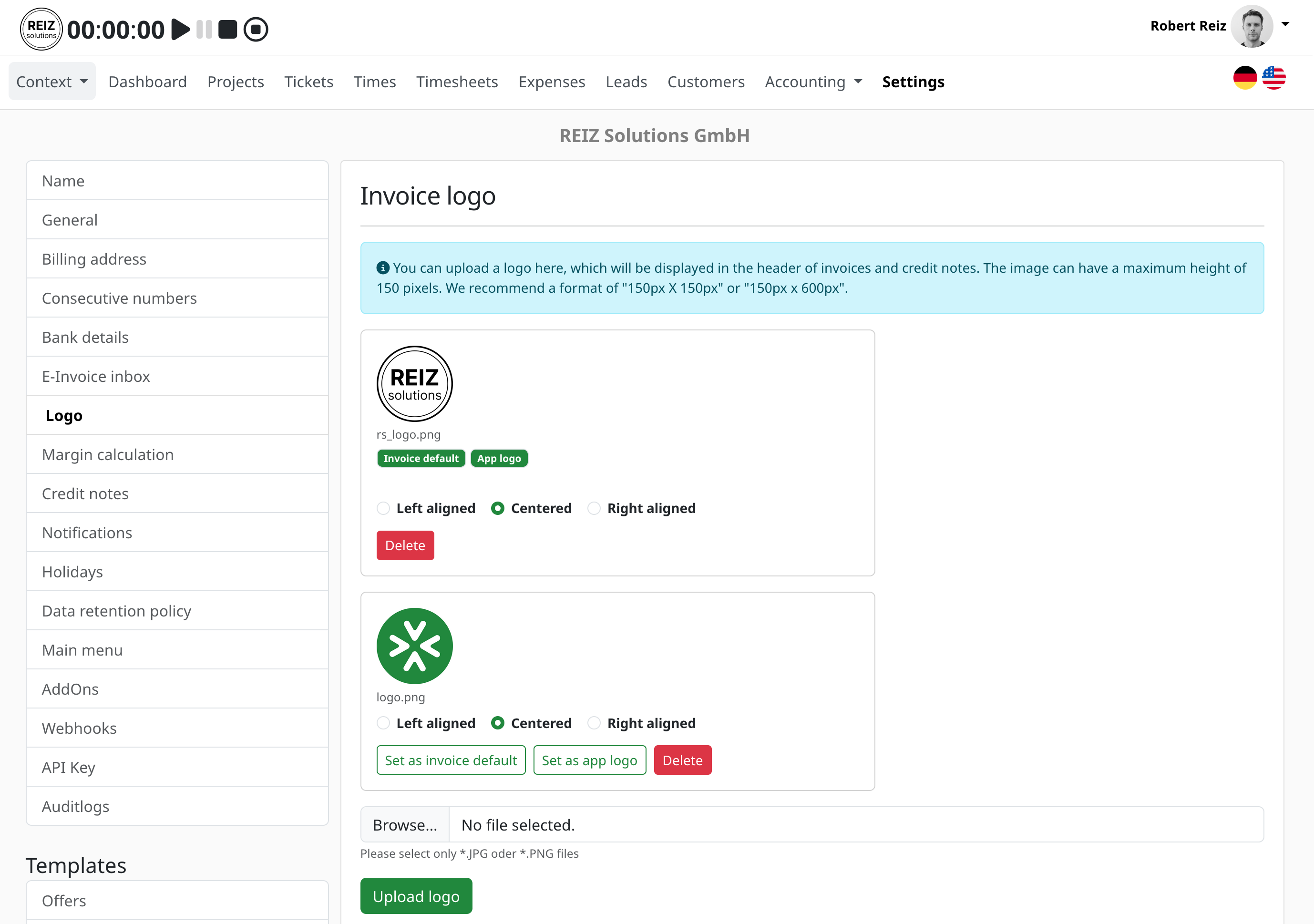
A few things to know:
Filenames are unique per organisation. If you upload a file named brand.png, you cannot upload another file with the same name — even if the casing differs (Brand.PNG is treated as a duplicate). This prevents confusion when referencing logos and keeps your logo library clean. If you need to replace a logo, delete the old one first or upload the new version under a different filename.
The upload limit is 10 logos. This covers virtually every real-world use case while keeping things manageable.
How Invoices and the App Pick the Right Logo
ZEIT.IO uses two independent "default" flags:
- Default invoice logo — used when rendering PDF invoices. If none is explicitly set, ZEIT.IO falls back to the first logo in your library.
- Default app logo — shown in the navigation bar and other UI surfaces. If none is set, the nav bar shows no custom logo.
This decoupling means changing your app logo never affects your invoices, and vice versa.
Migration from the Previous Single-Logo Setup
If your organisation already had a logo configured, it has been automatically migrated into the new multi-logo structure. Your existing logo has been preserved as-is and set as both the default invoice logo and the default app logo, so nothing changed visually. You can now add additional logos alongside it.
A Small Quality-of-Life Detail
When you upload a logo with a filename that already exists in your organisation, you get a clear error message explaining the conflict — not a generic failure. This makes it easy to understand what happened and fix it without guessing.
Assigning a Logo to a Customer — Set It Once, Get It Right Every Time
The most powerful part of multi-logo support isn't the logo library itself — it's the ability to assign a default logo directly to a customer. Once set, every invoice you create for that customer automatically uses the right logo. No manual switching, no risk of sending the wrong brand.
You configure this in the customer's settings under the Invoice & Dispatch tab. There you'll find a "Default Invoice Logo" dropdown that lists all logos uploaded to your organisation. Pick the one that belongs to this customer relationship, save, and you're done.
Here's a concrete example:
Imagine you run a small agency under two brands: Apex Studio (your main brand) and Apex Labs (a sub-brand you use for tech consulting work). You upload both logos to your organisation:
apex-studio.png— your default invoice logo for most customersapex-labs.png— used only for tech consulting engagements
You have three customers:
| Customer | Assigned Logo |
|---|---|
| Muster GmbH | (none — falls back to organisation default) |
| Techcorp AG | apex-labs.png |
| Retail Partners KG | (none — falls back to organisation default) |
When you open a new invoice for Techcorp AG, the moment you select that customer ZEIT.IO automatically switches the logo selector to apex-labs.png. You don't touch anything — it's already correct. For Muster GmbH and Retail Partners KG, the organisation default (apex-studio.png) kicks in as usual.
This eliminates an entire class of invoicing errors. Without this feature, the wrong logo on a customer-facing PDF is an easy mistake to make — especially when processing a batch of invoices at month end. With the customer assignment in place, it simply cannot happen.
We hope this gives your team more flexibility to present the right brand in the right context. If you run into any issues or have feedback, reach out via the common support channels.